The Inventory drop-down menu will appear only after clicking on 'Inventory List' or 'Vehicle Details' in the main sections horizontal tool bar:
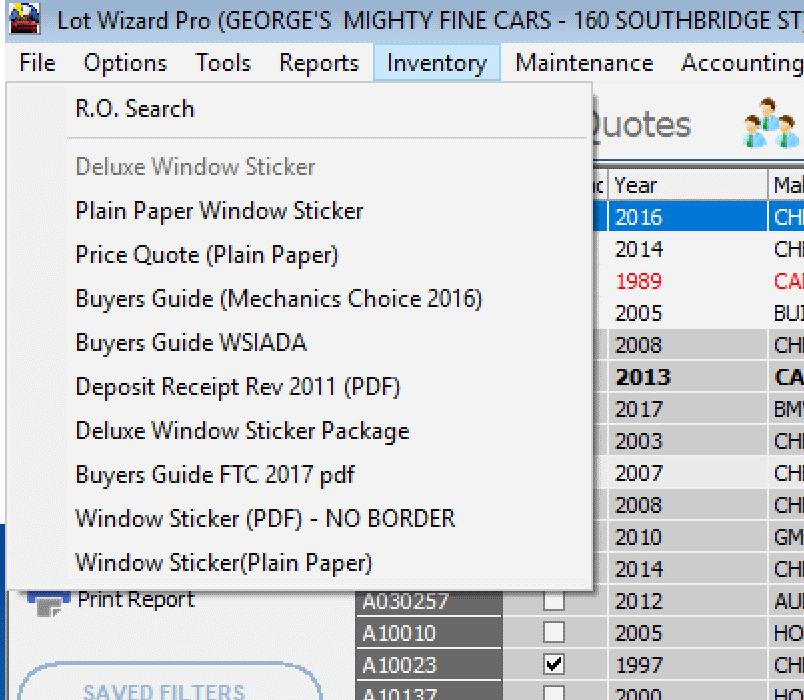
➢Clicking on Inventory in the horizontal menu bar at the top of the screen causes the Inventory drop down menu to appear.
➢Except for the RO Search*, Each dealer's menu will differ depending on what forms have been downloaded from our online library.
➢Use RO Search to locate a Vehicle by ROs attached to it. Filtering is available using R.O. Number, Stock Number, Vendor Name and Date Range.
➢Menus may also differ when optional packages are purchased, such as the Deluxe Sticker Package.
➢Additional form printing instructions can be ordered from Friday Systems, Inc. for your specific inventory paper forms.
➢The choices shown below are an example from one particular dealership. This example shows that a user has downloaded printer instructions for the Buyers Guide Form BHS-685-2 USA.
➢In order to activate the choices in this drop-down, you must open a specific vehicle from the Inventory.
*R.O. Search -- Searches for Repair Orders after entering appropriate filters.